Study Guide Maker
Turn your notes into a study guide you can quiz yourself with.
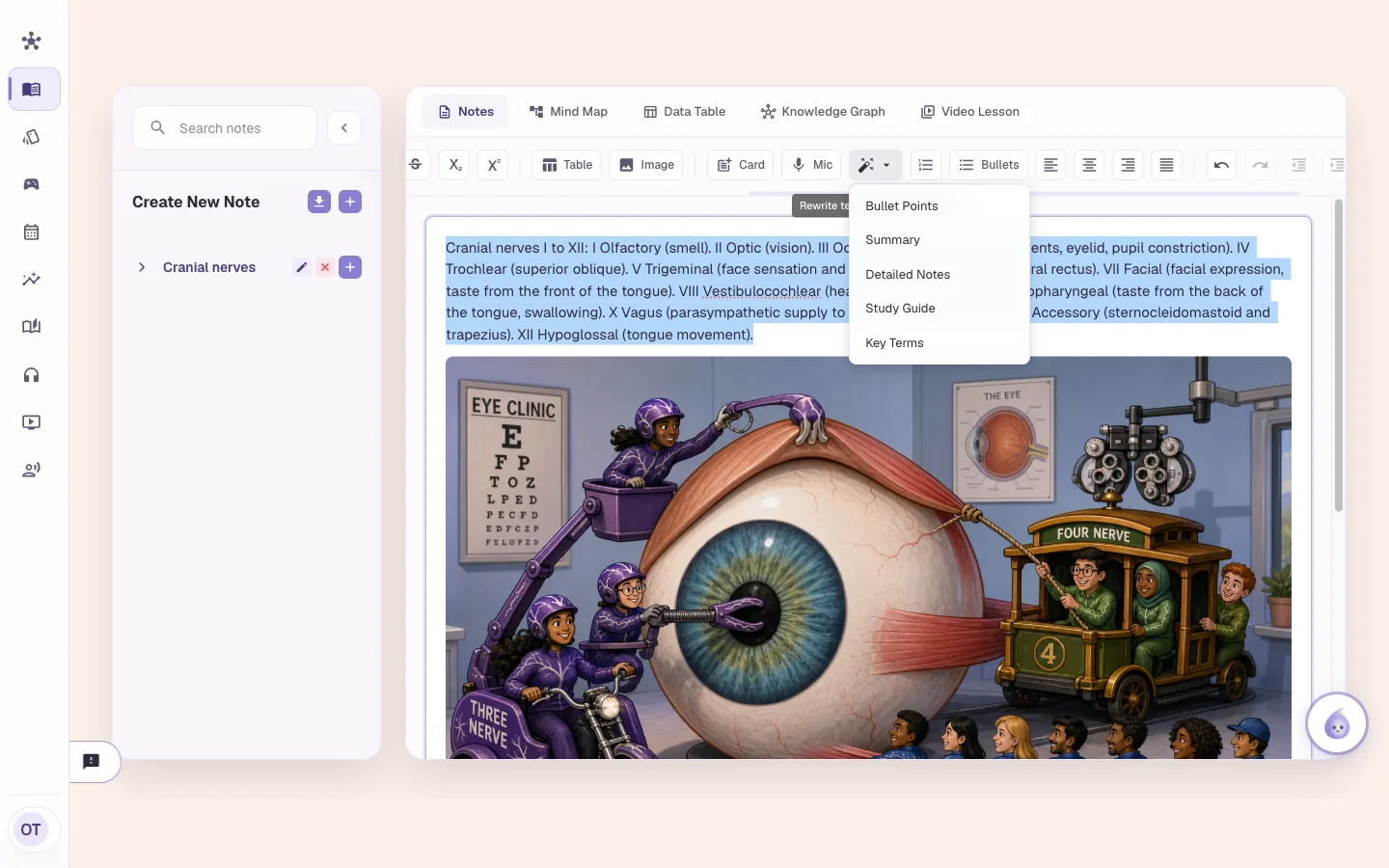
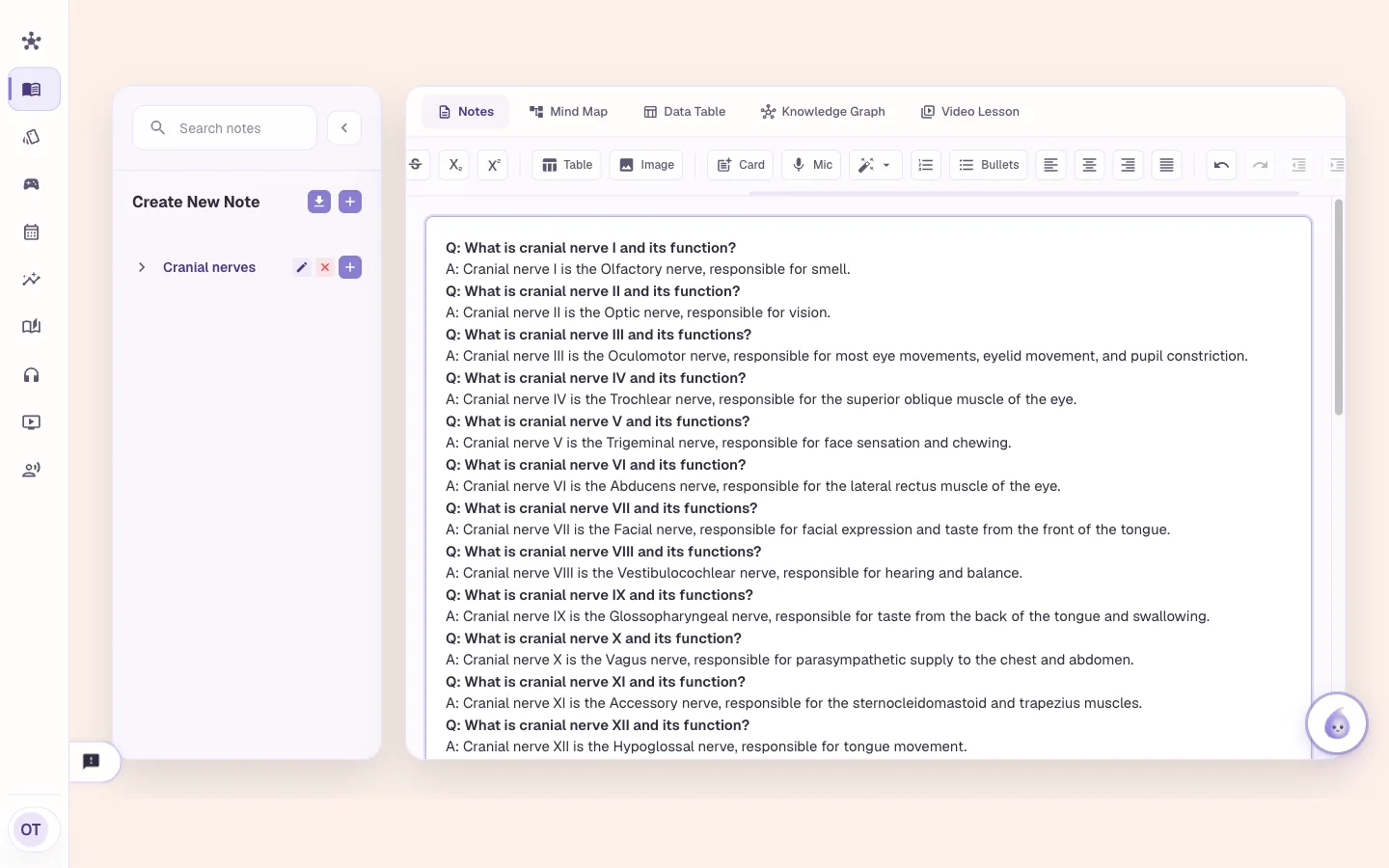
Select text in a Notebook note, press Rewrite and choose Study Guide. The selection becomes question-and-answer pairs, a bold question with its answer under it. Cover the answers and test yourself. The same menu makes bullet points, a summary, detailed notes or key terms.
Study Guide Maker
Select your notes, press Rewrite
Write or paste notes in the Notebook and select the part you want. Press Rewrite and pick a format. You get Bullet Points, Summary, Detailed Notes, Study Guide and Key Terms. You can rewrite up to 50,000 characters at a time.
Bullet Points, Summary, Detailed Notes
Study Guide
Key Terms
Study Guide Maker
Study Guide gives you questions and answers
Choose Study Guide and the selection comes back as question-and-answer pairs. In this capture, a paragraph on the twelve cranial nerves came back as twelve bold questions, each with its answer on the next line. The answers repeat what the note said. Cover them with your hand and say the answer first.
A bold question, then its answer
Made from your own note
Cover the answers and test yourself
Study Guide Maker
Pick the format that fits the job
A study guide is one format. Use Key Terms for the vocabulary, Summary for the short version, Detailed Notes for a fuller version and Bullet Points for a list. The result replaces the text you selected, so copy the original into another note first if you want both.
Five formats from one menu
Works on the text you select
Replaces the selection
Study Guide Maker
Then make cards, or upload the lecture
Select a line from the guide and press Card, and it is a flashcard in a deck. For a quiz, upload your lecture PDF to the Learning Hub, which makes a quiz of 8, 12 or 15 questions, editable slides and a mind map. The Notebook doesn't make quizzes from notes.
Card turns selected text into a flashcard
Learning Hub makes quizzes, slides and mind maps from files
Who it is for
Study guide maker for medical, nursing, NP and PA exams
The tool is the same for everyone. What changes is the exam it points at and the kind of week you are fitting it into.
Medical Students
- USMLE Step 1
- Step 2 CK
- COMLEX
- Shelf exams
Paste a lecture's notes, select the section on one organ system and rewrite it as a study guide. Cover the answers and quiz yourself before the lecture quiz.
See Alma for medical studentsNurses & Nursing Students
- NCLEX-RN
- NCLEX-PN
- HESI
- ATI
Select a pharmacology section and press Key Terms for the vocabulary. Then select it again and choose Study Guide for questions on the same material.
See Alma for nurses & nursing studentsNurse Practitioners
- AANP
- ANCC
- FNP
- AGNP
Take your notes on a guideline and rewrite them as questions and answers. Keep the ones you got wrong and press Card to put them in a deck.
See Alma for nurse practitionersPhysician Assistants
- PANCE
- PANRE
- EOR exams
Select your notes on a rotation topic and rewrite them as a study guide. Add the best questions to your deck with the Card button.
See Alma for physician assistants
Worth knowing before you start
- The rewrite works on the text you select, up to 50,000 characters.
- The rewritten text replaces your selection. Keep a copy of the original if you want both.
- An AI writes the questions and answers from your note. Check them against your source.
- The Notebook doesn't make quizzes from notes. Quizzes come from Learning Hub sources and Books.
Common questions
Can Alma make a study guide from my notes?
Yes. Select the text in a Notebook note, press Rewrite and choose Study Guide. The selection becomes question-and-answer pairs.
What formats can Alma rewrite my notes into?
Bullet Points, Summary, Detailed Notes, Study Guide and Key Terms. You can rewrite up to 50,000 characters at a time.
Can I make a study guide from a PDF?
A study guide is made from text in a Notebook note. For a PDF, upload it to the Learning Hub, which makes a quiz, editable slides and a mind map from it.
Does the study guide make a quiz?
It makes question-and-answer pairs you can cover and check yourself. The Notebook doesn't make quizzes from notes. Quizzes come from Learning Hub sources and Books.
Try the Study Guide Maker on something you are studying
Upload a lecture or paste a page of notes and see what comes back. No card required.
Start free
Last updated