Study Schedule
A study planner that builds your plan backwards from your exam date.
Tell Alma which exam you're sitting, when, and how many hours you actually have each day. She fills a calendar from today to the exam. Topics you're weaker at get more time, and a few days are kept free for catching up. You can add your own blocks, tick them off, and rebuild the plan when life gets in the way.

Study Schedule
Start with your exam and your real hours
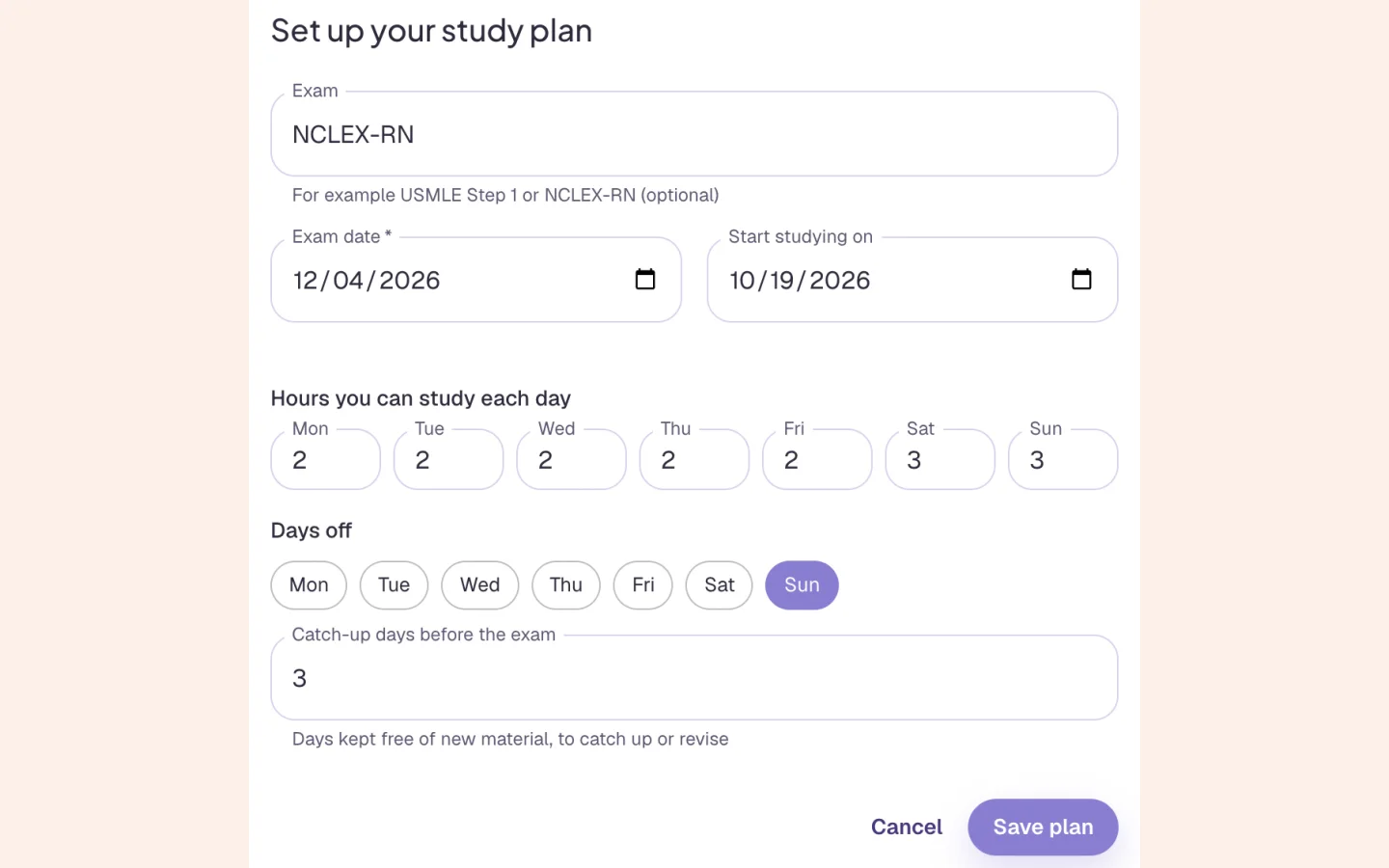
Setup takes a minute. Your exam and its date come from your profile if you've saved them. Then you set the hours you can study on each weekday (0 to 12), which days are off, and how many catch-up days to keep before the exam (3 by default). If your profile has no exam date, Quick start chips can suggest one when you create a plan: NCLEX-RN or NCLEX-PN (6 weeks), PANCE (8 weeks), USMLE Step 1 (8 weeks), Step 2 CK (6 weeks) and COMLEX Level 1 (8 weeks).
Exam and date from your profile, or a Quick start
Hours for each weekday, and days off
Catch-up days kept mostly free of new material
Study Schedule
A calendar that leans on your weak topics
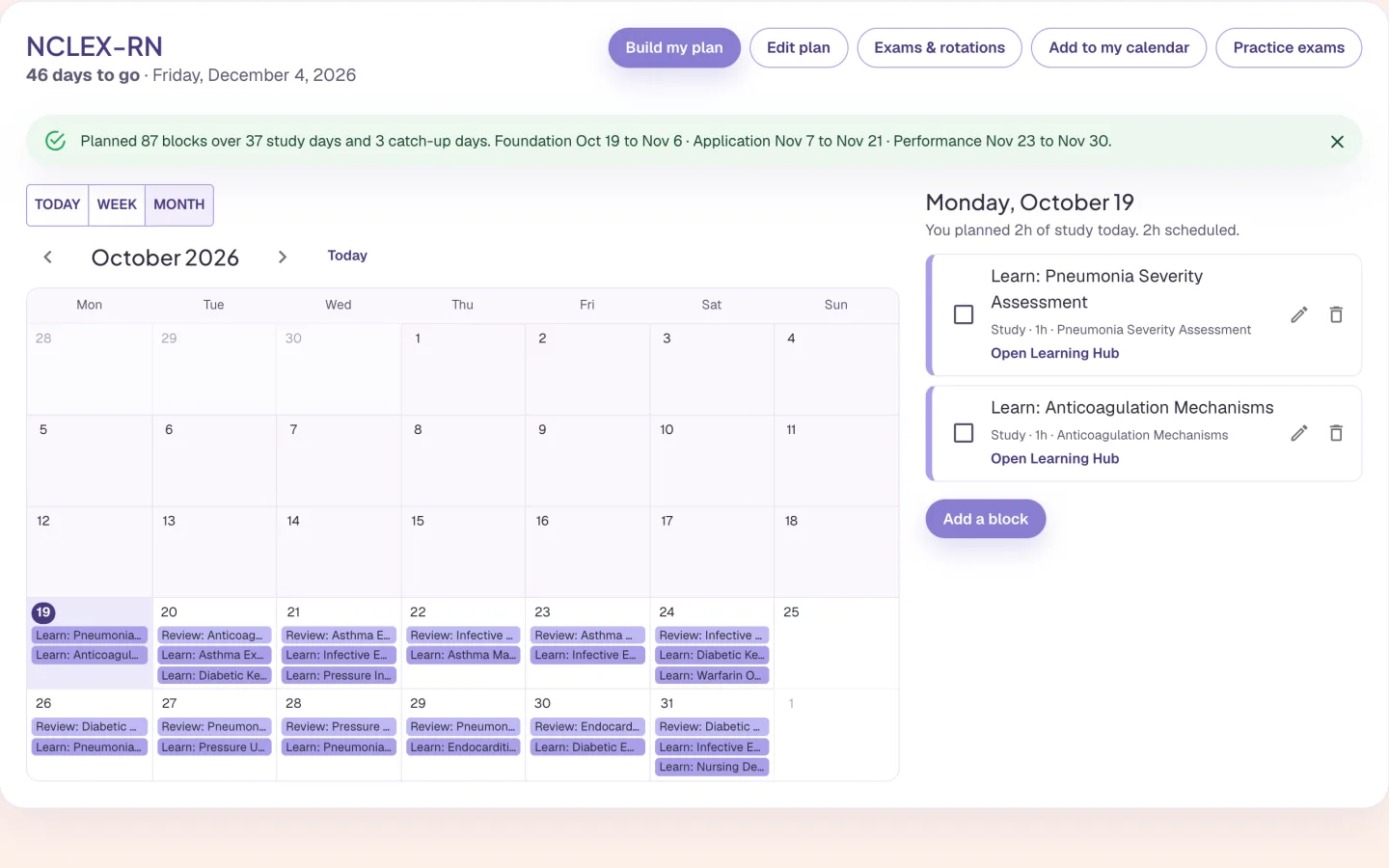
Build my plan fills the calendar from today to your exam, using your hours, days off and catch-up days. Each exam gets three phases. First you learn, then you practise mixed topics, then you do timed questions, with a practice exam about weekly. Topics you're weaker at, judged from your quizzes and flashcards, get more time and come back at growing intervals. In this capture it planned 87 blocks over 37 study days and 3 catch-up days, and the blocks are named after the account's own weak topics. Blocks you add, change or tick off stay when you rebuild.
Learn, practise, then timed questions
Weak topics get more time and come back later
Your own blocks and ticked blocks are kept
Study Schedule
Fell behind? Press Catch me up
If blocks from earlier days were never ticked off, a banner counts them and offers Catch me up. After you confirm, those blocks are marked Missed and the plan is rebuilt from today, under the same rules and hourly limit. The topics you missed come back first. Nothing you ticked, added or changed is touched. You can drag a block to another day, or change its day in the edit window.
Missed blocks are marked, not hidden
Their topics come back first
The same hourly limit as before
Study Schedule
Several exams, rotations, scores and calendar export
Exams & rotations holds up to 12 exams and 40 rotations. Give each exam a type, a date and a priority. A rotation can have its own hours and days off. While it runs, and you have two or more exams, the exam it ends with gets twice the share of the day.
Exam types: shelf, USMLE or other step, COMLEX, in-training, NCLEX, PANCE or PANRE, other
Import rotations from a spreadsheet, a calendar file, or a picture or PDF, and check the list before anything is added
Practice exams: a log of your scores, with a line on whether the last two went up, down or stayed about the same
A calendar file, or a private link for Google, Apple or Outlook
Who it is for
Study Schedule for medical, nursing, NP and PA exams
The tool is the same for everyone. What changes is the exam it points at and the kind of week you are fitting it into.
Medical Students
- USMLE Step 1
- Step 2 CK
- COMLEX
- Shelf exams
Add the shelf exam and USMLE as two exams, then your rotations, and mark each rotation as ending with its shelf. While the rotation runs, that shelf gets twice the share of the day, because you now have two or more exams. Log your NBME scores in Practice exams to see whether they're going up.
See Alma for medical studentsNurses & Nursing Students
- NCLEX-RN
- NCLEX-PN
- HESI
- ATI
If your profile has no exam date yet, pick the NCLEX-RN Quick start for a six-week plan, or enter your own date. Say you can do one hour on clinical days and three on your free days, and the plan fits around them. Keep the three catch-up days before the exam for whatever you missed.
See Alma for nurses & nursing studentsNurse Practitioners
- AANP
- ANCC
- FNP
- AGNP
There's no Quick start for the AANP or ANCC, so type the exam and its date. Then set your hours honestly. A clinic day can be zero, since hours run from 0 to 12 for each weekday, and the days off are yours to choose. When a week goes badly, Catch me up rebuilds the plan and keeps what you did.
See Alma for nurse practitionersPhysician Assistants
- PANCE
- PANRE
- EOR exams
Import the rotation calendar your program sends, as a spreadsheet or calendar file. Add each end-of-rotation exam as an exam its rotation ends with. The PANCE Quick start gives you an eight-week plan, and you can add the PANRE later.
See Alma for physician assistants
Worth knowing before you start
- The Schedule is included in every plan. Alma can't see it in chat or voice yet, but she can explain how it works.
- A picture or PDF of a schedule is sent to OpenAI to be read, and it can get a date wrong. You check the list before anything is added. Alma keeps no file.
- Practice exams only shows what you typed. It doesn't predict a result or tell you whether you'll pass.
- The private calendar link is read-only. Edits made in the calendar app don't come back, and anyone who has the link can see your schedule. You can make a new link, which stops the old one.
Common questions
Can I plan for more than one exam?
Yes. Exams & rotations holds up to 12 exams and 40 rotations. The soonest exam gets the time, and another joins once it's within about six weeks (sooner for low priority, much earlier for high priority), with higher priority getting more. While a rotation runs, the exam it ends with gets twice the share of the day.
What if I fall behind my plan?
A banner counts the blocks you never ticked off and offers Catch me up. After you confirm, they're marked Missed, the plan is rebuilt from today, and their topics come back first. Blocks you ticked, added or changed stay.
Can I put my study plan in Google Calendar or Apple Calendar?
Yes. Add to my calendar downloads a calendar file, or gives you a private link that Google Calendar, Apple Calendar or Outlook can subscribe to and keep up to date. The link is read-only.
Can I import my rotation schedule?
Yes, from a spreadsheet (.xlsx, .xls or .csv), a calendar file (.ics) from your school, or a picture or PDF of the schedule. You see up to 60 rotations to check, change or remove before anything is added.
Try the Study Schedule on something you are studying
Upload a lecture or paste a page of notes and see what comes back. No card required.
Start free
Last updated